The Decision Most Organizations Get Wrong Before They Know They Are Making It
Most organizations do not decide to use SharePoint as their knowledge management system. They drift into it.
SharePoint is already licensed through Microsoft 365. Someone creates a site. Departments start uploading documents. A few pages get built. Over time, the SharePoint environment becomes the de facto organizational knowledge repository by accumulation rather than by design.
The same pattern plays out with wikis. A technical team sets up Confluence for engineering documentation. It works well enough that other departments start using it. The wiki expands. Content volume grows. Three years later, the organization has a 4,000-page wiki that nobody fully trusts, that search navigates poorly, and that requires significant effort to maintain, and leadership is asking why knowledge management is still a problem after all this investment.
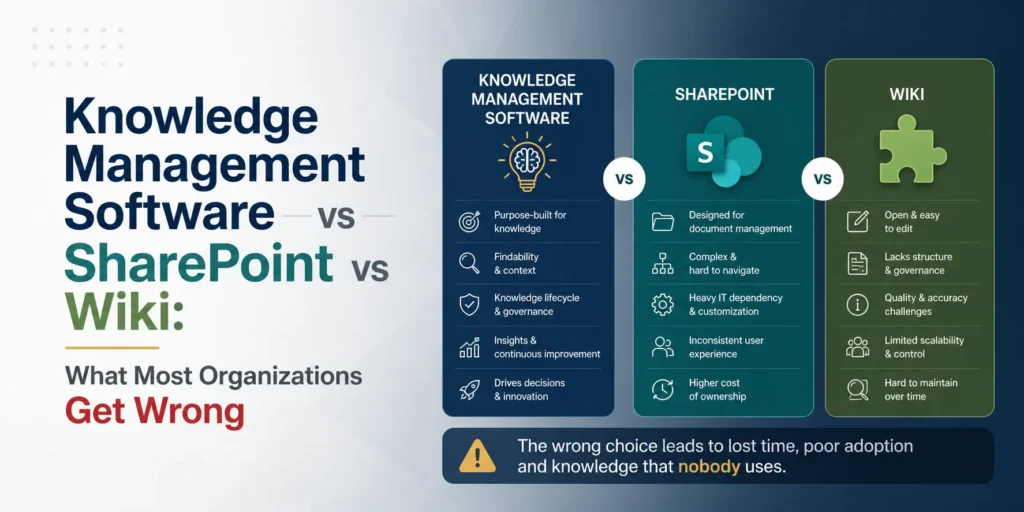
These are not technology failures. They are category errors. SharePoint was not built to do what knowledge management software does. A wiki was not built to do what knowledge management software does. Deploying either tool in a role it was not designed for produces predictable failure patterns that organizations experience as mysteries.
This article makes those failure patterns explicit, explains what each tool category was actually built for, and gives organizations a clear framework for choosing the right one for their specific situation.
Why This Comparison Matters More in 2026 Than It Did Five Years Ago
The arrival of enterprise AI has raised the stakes for this decision significantly.
Organizations are now deploying AI copilots, RAG-based knowledge retrieval systems, and AI-powered customer service tools that depend directly on the quality, structure, and governance of the organizational knowledge they retrieve from. The tool category that houses that knowledge determines whether the AI system produces reliable, trustworthy outputs or confidently wrong ones.
SharePoint environments that were adequate for human document navigation are structurally insufficient for AI retrieval. Wiki environments that served collaborative documentation needs perform poorly as AI knowledge sources because their content governance is too weak and their semantic structure is too thin.
This means the SharePoint versus wiki versus knowledge management software decision that was previously a question about search experience and user adoption is now also a question about AI readiness. Organizations that choose the wrong tool category for their knowledge management needs are simultaneously choosing the wrong foundation for their AI strategy.
That is a significantly more expensive mistake in 2026 than it was in 2020.
Three Tools, Three Distinct Purposes
Before comparing these tool categories against each other, each needs to be understood on its own terms. The comparison fails without this foundation because organizations routinely evaluate tools against requirements the tool was never designed to meet.
What SharePoint Actually Is
SharePoint is a document management and collaboration platform. It was built to solve specific organizational problems: storing documents with version control, managing access permissions across organizational hierarchies, enabling team collaboration on shared files, and providing intranet infrastructure for organizational communication.
These are genuine organizational needs and SharePoint addresses them well. It integrates deeply with Microsoft 365, which most large organizations already use. It provides robust access control, compliance features, and audit trails that regulated industries require. It scales to enterprise content volumes without performance degradation. For its intended purpose, it is a capable and mature platform.
What SharePoint was not built to do is manage knowledge in the KM sense. It was not built to surface knowledge in context at the moment of employee need. It was not built to monitor content quality over time and alert owners when articles become outdated. It was not built to understand semantic relationships between concepts and surface relevant knowledge when an employee searches using natural language rather than the exact terminology used in the document. It was not built to identify knowledge gaps by analyzing what employees search for and cannot find.
These distinctions are not criticisms of SharePoint. They are accurate descriptions of what the platform was designed for. The criticism belongs to organizations that deploy SharePoint as a knowledge management system and then evaluate its performance against knowledge management requirements it was never designed to meet.
What a Wiki Actually Is
A wiki is a collaborative documentation platform. It was built to enable multiple contributors to create, edit, and maintain a shared body of content in a low-friction environment. The core design principle of a wiki is radical editability: any contributor can modify any page, and the version history preserves every change.
Confluence, the dominant enterprise wiki platform, extends this foundation with page hierarchies, permission management, commenting, and integration with project management tools. Notion and Coda extend it further with database functionality that allows content to be organized and queried in ways that pure wiki platforms do not support.
Wikis work exceptionally well for specific knowledge management functions: collaborative documentation of technical processes, team-level knowledge bases where contributors and consumers are the same people, and dynamic documentation that evolves rapidly alongside the work it describes.
What wikis were not built to do is govern knowledge quality at organizational scale. The radical editability that makes wikis excellent for collaborative documentation makes them poor for maintaining authoritative knowledge over time. When anyone can edit anything, establishing and maintaining a single source of truth becomes difficult. When there is no ownership model, content ages without accountability. When there is no review workflow, outdated content persists indefinitely because no automated mechanism surfaces it for attention.
Again, these are not criticisms of wikis as a category. They are accurate descriptions of what the design philosophy optimizes for, and what it does not.
What Knowledge Management Software Actually Is
Purpose-built knowledge management software was designed specifically to address the organizational challenge of making collective knowledge reliably accessible, maintainable, and trustworthy over time.
The defining architectural difference between KM software and the other two categories is governance infrastructure. Purpose-built KM platforms are designed around the assumption that knowledge assets require active lifecycle management: they need owners who are accountable for their accuracy, review cycles that keep them current, expiration mechanisms that retire them when they are no longer valid, and analytics that identify gaps and quality problems before they become user experience failures.
Beyond governance, purpose-built KM software is typically designed around knowledge retrieval rather than document storage. Search in a KM platform is designed to interpret intent, surface contextually relevant content, and identify what employees search for and cannot find. These capabilities are architectural priorities in KM software and afterthoughts in document management and wiki platforms.
The trade-off is flexibility and integration depth. SharePoint’s integration with the Microsoft 365 ecosystem is deeper than any purpose-built KM platform can match. Confluence’s integration with Jira and the Atlassian ecosystem creates workflow connections that dedicated KM tools cannot replicate. Purpose-built KM software typically integrates well with a range of tools but is not the deepest integration point in any specific ecosystem.
SharePoint as a Knowledge Management System: An Honest Assessment
SharePoint is the most commonly deployed knowledge management solution in large enterprises, and it is also the source of more knowledge management program failures than any other platform. Understanding why requires looking at the specific ways SharePoint’s design assumptions conflict with knowledge management requirements.
Where SharePoint Works for Knowledge Management
SharePoint genuinely works for specific knowledge management use cases within its ecosystem.
Regulated document management is where SharePoint performs most strongly in a KM context. For organizations in financial services, healthcare, legal, or government where documents require formal version control, audit trails, retention policies, and compliance-ready access management, SharePoint’s document management infrastructure is well-suited. The knowledge management function here is narrow, specifically document governance, but it is one SharePoint performs reliably.
Microsoft 365 workflow integration is SharePoint’s clearest competitive advantage in knowledge management contexts. For organizations where knowledge work happens primarily in Teams, Outlook, and Office applications, SharePoint’s ability to surface knowledge within those environments reduces the behavioral change required for knowledge access. When a Teams message can link directly to a SharePoint knowledge article and that article can be co-authored in real time through Office Online, the access friction that defeats standalone KM platforms is reduced.
Large file and media storage is a genuine SharePoint strength that purpose-built KM platforms rarely match. Organizations whose knowledge assets include significant volumes of large files, video, audio, or rich media benefit from SharePoint’s storage architecture in ways that most KM platforms are not designed to support.
Where SharePoint Fails as a Knowledge Management System
The failure modes of SharePoint as a KM platform are consistent enough across organizations that they constitute a pattern rather than a set of individual implementation problems.
Search is the most frequently cited SharePoint knowledge management failure. SharePoint search is keyword-based and index-dependent. It returns documents that contain the search terms rather than knowledge that addresses the search intent. In environments where content is organized around document types and departmental hierarchies rather than knowledge topics and user needs, search returns results that are technically relevant but operationally useless. Employees learn quickly that SharePoint search does not reliably surface what they need and revert to asking colleagues, bookmarking specific pages, or recreating knowledge that already exists somewhere in the environment.
Content governance is the structural failure that produces SharePoint’s most damaging long-term knowledge management outcomes. SharePoint has no native mechanism for assigning knowledge ownership at the asset level, sending automated review reminders when content ages, identifying and surfacing outdated content for retirement, or measuring content health across the environment. Organizations deploy SharePoint with good intentions about maintaining content quality and discover that without automated governance infrastructure, quality maintenance requires manual oversight at a scale that no organization sustains consistently.
The result is the SharePoint graveyard: an environment containing thousands of documents and pages, a significant percentage of which are outdated, duplicated, or simply wrong, with no reliable mechanism for users to distinguish current authoritative content from historical artifacts. This environment is familiar to almost everyone who has worked in a large organization with a long SharePoint history.
Navigation and information architecture is the third consistent failure point. SharePoint’s organizational structure reflects departmental and document type hierarchies rather than knowledge consumer needs. Finding information requires knowing where to look before finding it, which is the structural opposite of effective knowledge retrieval. The navigation models that make sense to the IT administrators who set up the environment consistently fail the employees who need to use it without understanding its architecture.
AI readiness is the newest and increasingly consequential SharePoint knowledge management failure. Microsoft is investing significantly in Copilot integration with SharePoint, and for organizations with well-governed, semantically structured SharePoint environments, this integration offers genuine value. However, the majority of enterprise SharePoint environments are not well-governed or semantically structured. They are the graveyards described above. Copilot deployed against a SharePoint environment full of outdated, duplicated, and poorly tagged content produces the AI failure pattern that is now well-documented across enterprise deployments: confident, professionally presented, wrong answers.
The Honest Verdict on SharePoint for KM
SharePoint is appropriate as a knowledge management foundation when the organization has a dedicated governance team actively managing content quality, a well-designed information architecture built around knowledge consumer needs rather than departmental structure, strong Microsoft 365 ecosystem integration that makes SharePoint the path of least resistance for knowledge access, and compliance or regulatory requirements that benefit from SharePoint’s document management infrastructure.
Outside these conditions, SharePoint functions as a knowledge storage environment rather than a knowledge management system. The distinction matters because storage without governance produces outcomes that look like knowledge management failures but are actually knowledge governance failures.
Wikis as Knowledge Management Systems: An Honest Assessment
Wikis occupy a more complicated position in the knowledge management landscape than SharePoint because their design philosophy is closer to genuine KM principles than document management is. The collaborative, editable, interconnected nature of wikis aligns better with how organizational knowledge actually behaves than the hierarchical document storage model of SharePoint.
The challenge is that alignment in philosophy does not translate to equivalence in capability, particularly at organizational scale and over extended time periods.
Where Wikis Work for Knowledge Management
Team and departmental knowledge bases represent the strongest wiki use case in an organizational KM context. When the contributors and consumers of knowledge are the same people, when the knowledge domain is well-defined and relatively bounded, and when the team has strong documentation habits, a wiki performs excellently. Engineering teams documenting technical systems, product teams maintaining feature specifications, and operations teams documenting processes they own all describe wiki environments that function well for extended periods.
The reason these contexts work is that the accountability problem of wikis, anyone can edit anything with no ownership structure, is mitigated when the community is small and coherent enough that informal accountability replaces formal governance. A ten-person engineering team knows who broke the documentation, cares about fixing it, and has enough collective stake in the quality of the wiki to maintain it without automated governance infrastructure.
Rapidly evolving documentation is another genuine wiki strength. For knowledge that changes frequently, such as software documentation, project status, and actively developed processes, the wiki’s low-friction editing model allows documentation to keep pace with reality in ways that more governed systems often cannot. The cost of formal review workflows is that content approval takes time. When content needs to change faster than approval cycles allow, the wiki’s editability is a genuine advantage.
Where Wikis Fail as Knowledge Management Systems
Content decay is the defining failure mode of wikis at organizational scale, and it is as consistent as SharePoint’s search failure. Wikis grow fast and decay faster than organizations expect.
The growth phase of a wiki is characteristically optimistic. Content is fresh, contributors are engaged, and the platform appears to be solving the knowledge management problem. The decay phase begins when content volume exceeds the community’s capacity to maintain it informally. Articles that were accurate when written become outdated as processes change, products evolve, and organizational structures shift. In the absence of ownership assignment and review reminders, outdated content persists because no mechanism surfaces it for attention.
Employees who encounter outdated wiki content do not update it, even in wiki environments where they theoretically could. They note it as untrustworthy and move on. Over time, the proportion of untrustworthy content grows, the platform’s reputation for reliability declines, and employees stop consulting it. The wiki does not disappear. It persists as a large, partially accurate, unreliable knowledge environment that consumes ongoing storage and administrative attention without delivering proportionate knowledge management value.
Findability at scale is the second consistent wiki failure. Wiki organization structures that are logical to the contributors who created them become opaque to employees who did not participate in their creation. Search in most wiki platforms is keyword-dependent and does not compensate for the terminology variation that naturally exists across departments, regions, and seniority levels in large organizations. The result is that employees cannot find knowledge that technically exists, which is operationally equivalent to the knowledge not existing.
Authority and trust are structural challenges in wiki environments that governance-light designs cannot fully resolve. When any contributor can edit any page, establishing a single authoritative source of truth for important organizational knowledge requires cultural and process discipline that most organizations cannot sustain without technological support. The question “is this current” is one that employees cannot reliably answer in most wiki environments, and the uncertainty this creates drives the reversion to colleague-asking that marks wiki failure at organizational scale.
The Honest Verdict on Wikis for KM
Wikis are appropriate as knowledge management systems for teams and departments with strong documentation culture, bounded knowledge domains, high contributor-consumer overlap, and content that evolves fast enough that the editability advantage outweighs the governance disadvantage.
Wikis are not appropriate as organizational knowledge management systems for environments above roughly 50 contributors, knowledge domains that require authoritative single sources of truth, compliance or quality contexts where content accuracy is non-negotiable, and organizations without the cultural discipline to maintain content quality without automated governance support.
The migration from wiki to purpose-built KM software is one of the most common knowledge management investments organizations make, and it is almost always made later than it should be because the wiki’s failure mode is gradual rather than catastrophic. Organizations that wait until the wiki has visibly failed are migrating legacy debt rather than building a clean foundation.
Purpose-Built Knowledge Management Software: What It Does That the Others Cannot
Having established what SharePoint and wikis do well and where they fail, the question is what purpose-built knowledge management software provides that justifies either the investment or the migration effort.
The answer is governance infrastructure, and specifically the five capabilities that governance infrastructure enables.
Asset-Level Content Ownership
Purpose-built KM platforms assign ownership at the individual knowledge asset level, not the folder or space level. This means every article has a named owner who is accountable for its accuracy, who receives automated notifications when it requires review, and whose ownership transfers when they leave the organization. This capability sounds simple. It is structurally transformative for knowledge base quality over time.
The reason it is transformative is that it converts content maintenance from a shared responsibility that nobody owns to an individual accountability that specific people own. Shared responsibility for knowledge quality in SharePoint and wiki environments produces the outcome that shared responsibilities consistently produce: the work gets done inconsistently by the people who care most and neglected entirely when those people are busy.
Automated Content Health Management
Purpose-built KM software monitors the age, usage, and quality signals of every knowledge asset and surfaces content that requires attention before it becomes a user-facing quality problem. Review reminders go to owners when articles reach their review date. Content health dashboards show administrators which articles are overdue, which are generating search abandonment, and which have been flagged by users as inaccurate.
This capability converts knowledge base maintenance from a reactive, manual activity to a proactive, systematic one. The difference in knowledge base quality between organizations with automated content health management and those without is consistently dramatic and becomes more so over time as the compounding effect of systematic maintenance versus periodic manual review plays out.
Search Built for Knowledge Retrieval
The search architecture in purpose-built KM platforms is designed for knowledge retrieval rather than document location. This distinction produces meaningfully different user experiences in practice.
Knowledge retrieval search interprets the intent behind a query and surfaces content that addresses that intent, even when the terminology used in the query does not match the terminology used in the content. It understands that “how do I process a customer refund” and “refund processing procedure” are the same question expressed differently. It surfaces related articles alongside primary results, because knowledge about a topic rarely exists in a single article. It identifies what employees searched for and could not find, which is the most actionable signal available for improving knowledge base quality.
Document location search, which is what SharePoint and most wiki platforms provide, returns documents containing the query terms. When the user knows the right terminology and the document is correctly tagged, this works. When the user does not know the exact terminology, or the document is tagged inconsistently, or the content exists in a form the user did not anticipate, the search fails.
Knowledge Gap Identification
The analytics in purpose-built KM platforms are designed to identify what employees need and cannot find, not just to measure what they access and use. Search analytics that surface frequent queries returning no results tell knowledge managers specifically what to create next. Article feedback mechanisms that allow employees to flag inaccurate or incomplete content tell knowledge managers what to fix. Usage patterns that show high search abandonment on specific topics tell knowledge managers where content quality is insufficient.
This feedback loop is what allows a knowledge base to improve continuously rather than being built once and degrading steadily. It is the analytics capability most consistently absent from SharePoint and wiki environments and most consistently present in purpose-built KM platforms.
AI Retrieval Readiness
As organizations deploy enterprise AI systems that retrieve knowledge as part of their operation, the quality of the knowledge retrieval layer becomes a direct determinant of AI output quality. Purpose-built KM platforms designed for AI readiness provide semantic search infrastructure, metadata governance at the asset level, content provenance tracking, and API architecture that supports retrieval-augmented generation.
These capabilities are not available in standard SharePoint environments or standard wiki platforms without significant custom development. They are designed-in features of purpose-built KM platforms built for the current enterprise AI context.
The Decision Framework: Which Tool Fits Which Situation
The following framework produces a defensible tool choice for most organizational situations. It is structured as a series of diagnostic questions rather than a prescriptive recommendation because the right answer depends on organizational specifics that no external guide can fully anticipate.
Start With Scale and Growth Rate
Under 20 people with slow growth: a well-governed wiki or structured workspace tool is likely sufficient. The governance limitations of wiki platforms are manageable at this scale with strong documentation culture. Invest in habits before investing in platform sophistication.
20 to 100 people or growing fast: the governance limitations of wikis and the search limitations of SharePoint begin producing measurable operational problems at this scale. Purpose-built KM software starts delivering returns that justify the investment.
Above 100 people: the failure modes of both SharePoint and wikis at this scale are well-documented and consistent enough that purpose-built KM software should be the default starting assumption rather than the upgrade consideration.
Identify the Primary Knowledge Management Challenge
If the primary challenge is document compliance, version control, and access management in a regulated environment: SharePoint is the appropriate foundation. Supplement with governance processes rather than replacing with a different platform.
If the primary challenge is team-level collaborative documentation for a technically sophisticated team with strong documentation culture: a wiki is appropriate for that team’s knowledge. Recognize that this does not scale to organizational KM without additional governance infrastructure.
If the primary challenge is making organizational knowledge findable and trustworthy for employees who need it at the moment of need: purpose-built KM software is the appropriate category. The specific platform selection within that category depends on use case, scale, and budget.
If the primary challenge is building knowledge infrastructure that will support enterprise AI deployment: purpose-built KM software with semantic search and AI readiness features is the only category that addresses this requirement adequately.
Assess Existing Ecosystem Investment
Organizations deeply invested in Microsoft 365 should evaluate whether Microsoft’s own KM-oriented products, specifically Microsoft Viva Topics and Viva Engage, address their knowledge management needs within the Microsoft ecosystem before evaluating external platforms. These products represent Microsoft’s acknowledgment that SharePoint alone does not meet organizational knowledge management requirements.
Organizations deeply invested in the Atlassian ecosystem should evaluate Confluence’s paid tier features, including page ownership, analytics, and content health tools, against their governance requirements before assuming migration to a purpose-built platform is necessary.
The cost of working within an existing ecosystem is lower than the cost of introducing a new platform category. The cost of compromising on knowledge management capability because the existing ecosystem does not fully support it is higher than most organizations calculate when making the initial decision.
Calculate the Real Cost of the Wrong Choice
The cost of choosing SharePoint or a wiki when the organization needs purpose-built KM software is not just the license fee for the platform the organization eventually migrates to. It includes the content migration effort, the organizational disruption of the transition, the productivity loss during the migration period, and the institutional skepticism that a visible knowledge management failure creates.
These costs are large enough that organizations which calculate them honestly almost always conclude that investing in the right tool category at the start is less expensive than migrating from the wrong category later, even when the initial investment appears higher.
The Migration Question: When and How to Move
Organizations using SharePoint or a wiki for knowledge management and recognizing the failure patterns described in this article face a decision about whether to migrate to purpose-built KM software, supplement the existing platform with governance processes and additional tools, or accept the limitations as an acceptable cost of ecosystem coherence.
The supplement approach works in specific situations: when the primary knowledge management failures are governance-related rather than architectural, and when the organization has the discipline to maintain manual governance processes consistently. Building content ownership registers, manual review cycles, and editorial standards on top of SharePoint or Confluence can extend the useful life of those platforms significantly. The limit of this approach is that manual governance processes do not scale reliably as content volume and contributor diversity grow.
The migration decision becomes clearly correct when the organization has already attempted governance supplementation and watched it degrade, when search quality failures are producing measurable operational costs, when AI deployment plans require knowledge retrieval infrastructure that the existing platform cannot provide, or when content volume and decay have reached a level that makes the existing environment more liability than asset.
When migration is the right decision, the most important implementation choice is content selection, specifically deciding what to migrate and what to retire. Organizations that migrate everything from SharePoint or a wiki into a new platform bring the governance problems of the old environment into the new one. Organizations that use the migration as an opportunity to audit, curate, and retire outdated content arrive in the new platform with a knowledge base that employees trust from day one.
That distinction, between migration as a technical transfer and migration as a knowledge base renewal, determines whether the new platform succeeds where the old one failed or replicates the same failure in a different container.
Frequently Asked Questions
Can SharePoint be a good knowledge management system?
SharePoint can support specific knowledge management functions well, particularly document governance in regulated environments and knowledge access within the Microsoft 365 ecosystem. It is not a purpose-built knowledge management system and consistently fails at organizational KM requirements including semantic search, content health governance, and knowledge gap identification. Organizations that need these capabilities require either purpose-built KM software or significant supplementation of SharePoint with governance processes and additional tools.
Is Confluence a knowledge management tool?
Confluence is a wiki and collaborative documentation platform that serves knowledge management functions for teams and departments with strong documentation culture and bounded knowledge domains. It is not a purpose-built knowledge management system and exhibits the governance limitations common to wiki platforms at organizational scale. Atlassian’s investment in Confluence analytics and page governance features in recent years reflects recognition of these limitations, but Confluence’s design philosophy remains wiki-oriented rather than KM-oriented.
What is the difference between a knowledge base and a knowledge management system?
A knowledge base is a repository of organized information. A knowledge management system is the full platform including the knowledge base, the governance infrastructure, the authoring and contribution workflows, the analytics, and the maintenance mechanisms that keep the knowledge base current and trustworthy over time. SharePoint and wikis can serve as knowledge bases. Purpose-built KM software provides the full knowledge management system.
When should an organization migrate from SharePoint to dedicated KM software?
The migration decision is clearly warranted when search quality failures are causing measurable productivity loss, when content decay has reached a level that employees no longer trust the environment, when AI deployment plans require knowledge retrieval infrastructure that SharePoint cannot provide, or when governance supplementation has been attempted and has not produced sustained improvement. Organizations that wait for a visible crisis to trigger migration consistently find the migration more difficult and more expensive than organizations that migrate proactively at the first clear signal.
Is it possible to use SharePoint and dedicated KM software together?
Yes, and this is a common architecture for large organizations. SharePoint handles document management, compliance, and Microsoft 365 integration. Purpose-built KM software handles knowledge governance, semantic search, content health management, and employee-facing knowledge retrieval. The integration between the two platforms varies in quality depending on the KM platform selected and the organization’s technical architecture. Organizations considering this approach should validate integration quality before committing to a platform combination.
The Bottom Line
SharePoint, wikis, and knowledge management software are not competing solutions to the same problem. They are different tools designed for different problems that happen to overlap at the edges.
SharePoint is a document management and collaboration platform. It handles documents, compliance, and Microsoft 365 integration well. It handles knowledge governance, semantic retrieval, and content health management poorly.
Wikis are collaborative documentation platforms. They handle team-level knowledge creation and rapidly evolving documentation well. They handle organizational knowledge governance, authoritative single sources of truth, and knowledge maintenance at scale poorly.
Purpose-built knowledge management software is designed for organizational knowledge governance, findability, and maintenance. It handles content lifecycle management, semantic retrieval, and knowledge gap identification well. It handles deep ecosystem integration and compliance document management less comprehensively than the specialized platforms designed for those functions.
Most organizations need elements of more than one category. The question is not which tool wins but which tool serves as the primary knowledge management foundation, and which plays a supporting role within a broader knowledge architecture.
Organizations that answer that question based on an honest assessment of their primary knowledge management challenge, their organizational scale, and their governance capacity will build knowledge infrastructure that serves them for years. Organizations that answer it based on what is already licensed, what is easiest to deploy, or what the loudest internal advocate prefers will build the knowledge management problem they are trying to solve.
The tools have not changed. The cost of choosing the wrong one has.
Related reading:
- How to Choose Knowledge Management Software: The Buyer’s Guide No Vendor Will Write
- Knowledge Management Software for Small Business: What Works Under 100 Employees
- Free Knowledge Management Software: What It Can and Cannot Do
- How to Implement Knowledge Management Software Without Losing the First Six Months