Organizations invest in digital tools to help employees access information, solve problems, and make better decisions. Yet many businesses still struggle with a familiar problem: the information they need already exists somewhere, but finding it or knowing whether it can be trusted takes too much time.
Policies sit in document repositories, project lessons are scattered across shared drives, technical guidance lives in specialist systems, and important decisions remain buried in conversations. As organizations adopt AI, the pressure to make this information accessible is increasing.
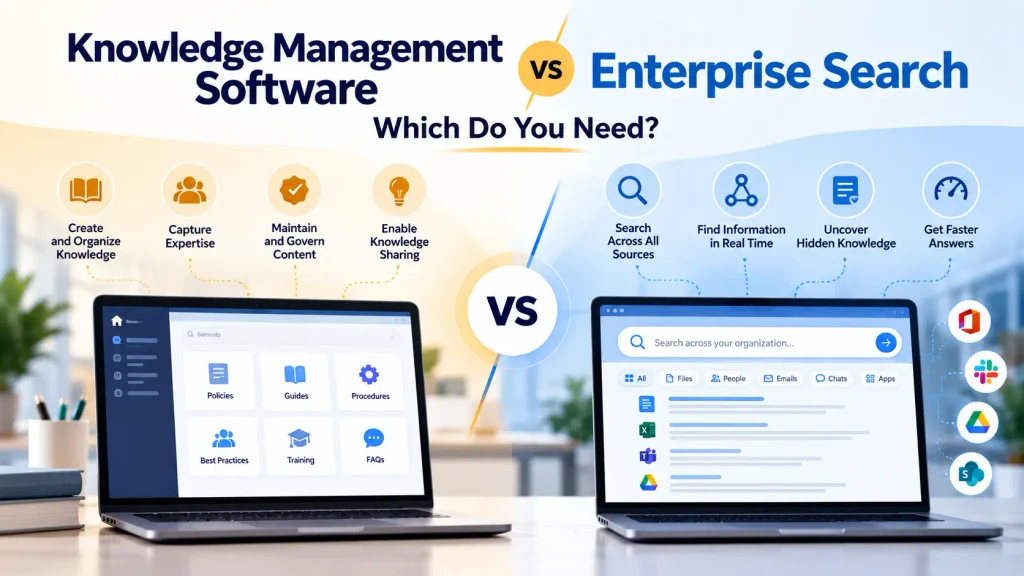
Two technology categories frequently enter the conversation: knowledge management software and enterprise search. Although they share a common objective of improving access to organizational knowledge, they address different aspects of the problem.
Knowledge management software helps organizations capture, organize, maintain, share, and reuse knowledge. Enterprise search helps employees find relevant information across the systems where it resides. The distinction is important when choosing technology because improving search does not automatically establish a reliable knowledge management process, and building a well-organized knowledge repository does not guarantee that employees will find what they need.
For some businesses, a knowledge management platform is the right investment. Others primarily need enterprise search. Organizations with complex knowledge requirements may benefit from both capabilities working together.
The right choice depends on where knowledge is getting lost, what employees need to accomplish, and whether the underlying problem concerns information discovery, knowledge quality, or both.
What Is Knowledge Management Software?
Knowledge management software helps organizations manage knowledge throughout its lifecycle, from creation and capture to validation, distribution, application, and eventual review or retirement.
Unlike a basic document repository, a knowledge management platform is intended to make organizational knowledge useful beyond the moment it is created. It can provide structured knowledge articles, documented procedures, lessons learned, frequently asked questions, expert directories, collaborative workspaces, and other resources that employees can use to perform their work.
Consider a customer support organization that receives hundreds of questions about its products. Employees may already have answers scattered across internal documents, previous support cases, and individual team members’ experience. A knowledge management platform can help turn recurring solutions into approved, reusable articles that support agents can consult when handling future cases.
The same principle applies to other departments. Human resources can maintain authoritative employee policies, engineering teams can preserve technical lessons, and project teams can document decisions and experiences that would otherwise disappear when a project ends.
The important capability is not simply storing information. It is establishing a process through which knowledge remains accurate, accessible, relevant, and reusable.
Depending on the product, knowledge management software may include content authoring, approval workflows, version history, access controls, feedback mechanisms, analytics, collaboration, and AI-powered assistance. The depth of these capabilities varies considerably, so buyers should evaluate actual functionality rather than assume that every product offers the same knowledge management features.
What Is Enterprise Search?
Enterprise search software helps employees discover information across multiple organizational systems through a unified search experience.
Instead of opening several applications individually, employees can search across connected sources such as document repositories, intranets, collaboration platforms, customer relationship management systems, and internal knowledge bases. The search platform indexes available content and retrieves results based on the query and its relevance to the user.
For example, a project manager preparing a proposal may need information from previous project reports, sales documents, technical specifications, and customer discussions. Without enterprise search, the manager might have to open each system, run separate searches, and manually compare the results.
An enterprise search platform can bring relevant material from connected sources into a single discovery experience, subject to the system’s integrations, indexing capabilities, and access controls.
Modern enterprise search increasingly incorporates semantic retrieval, natural language processing, AI-generated summaries, and retrieval-augmented generation. These capabilities can help users ask questions in ordinary language and receive answers based on information retrieved from organizational sources.
However, enterprise search does not necessarily take responsibility for the entire knowledge lifecycle. It may help employees find a document without establishing whether that document is current, whether its contents have been approved, or whether the organization should continue using it.
That distinction becomes important when employees need authoritative answers rather than simply a collection of potentially relevant search results.
Knowledge Management Software vs Enterprise Search: Key Differences
The two categories overlap, but their primary responsibilities differ.
Knowledge management software focuses on the processes and capabilities required to create, maintain, govern, and reuse organizational knowledge. Enterprise search focuses on discovering information across available sources.
The following comparison highlights the practical differences businesses should consider.
| Evaluation criterion | Knowledge management software | Enterprise search |
|---|---|---|
| Primary purpose | Manage and reuse organizational knowledge | Discover information across systems |
| Content creation | Often includes knowledge authoring and editing | Usually focuses on retrieving existing content |
| Knowledge governance | May support ownership, approvals, reviews, and lifecycle management | Depends on the platform; may rely on source systems for governance |
| Search capabilities | Searches content managed by the platform and sometimes connected sources | Searches across multiple connected repositories |
| Content freshness | Can support review schedules and content maintenance | Depends on indexing freshness and the governance of connected sources |
| Knowledge reuse | Supports structured articles, procedures, lessons learned, and other reusable knowledge | Helps employees discover and access existing knowledge |
| AI capabilities | May include AI-assisted authoring, answers, recommendations, and knowledge management workflows | May include semantic retrieval, AI answers, summarization, and source discovery |
| Typical users | Knowledge managers, content owners, support teams, operations teams, and employees | Employees who need to find information across organizational systems |
| Best suited to | Organizations that need to establish and maintain reliable, reusable knowledge | Organizations that struggle to find information distributed across systems |
These distinctions describe common product capabilities, not rigid market boundaries. Some knowledge management platforms offer enterprise-wide search, while some enterprise search products include content management, AI assistants, and knowledge governance features.
The purchasing decision should therefore be based on the capabilities your business needs, not simply the category printed on a vendor’s website.
When Should Your Business Choose Knowledge Management Software?
Knowledge management software becomes particularly valuable when the organization needs to improve how knowledge is captured, maintained, and reused.
One common indicator is repeated work. Employees repeatedly ask the same questions, experienced staff spend time explaining established procedures, or teams recreate solutions that already exist elsewhere in the organization. These patterns suggest that knowledge is not being captured or maintained in a form that others can reliably reuse.
Another indicator is inconsistent information. Different departments may maintain their own versions of policies, operating procedures, or technical guidance. Employees may be unable to determine which version is authoritative, creating unnecessary risk and confusion.
Knowledge loss is another important consideration. When experienced employees leave, projects conclude, or teams reorganize, valuable expertise can disappear unless it has been documented and transferred. A knowledge management platform can support this process, although capturing tacit knowledge still requires deliberate activities such as interviews, mentoring, retrospectives, and expert knowledge transfer.
Businesses should also consider knowledge management software when content requires formal ownership and review. In regulated or quality-sensitive environments, it may be important to know who approved a procedure, when it was last reviewed, and whether employees are accessing the current version.
In these situations, the problem extends beyond finding information. The organization needs a dependable way to maintain knowledge and make it available for future use.
When Should Your Business Choose Enterprise Search?
Enterprise search is often the more appropriate starting point when information already exists across multiple systems but employees cannot locate it efficiently.
Imagine a company using Microsoft 365 for documents, Slack for discussions, a CRM for customer records, and a separate platform for technical documentation. Each system may have its own search functionality, but employees still need to know where information is likely to reside.
Enterprise search can reduce this fragmentation by connecting supported sources and providing a unified way to discover information.
It is particularly useful when employees work across departments, when knowledge is distributed across numerous applications, or when replacing existing repositories would be impractical.
For example, a sales representative preparing for a customer meeting may need information from previous interactions, product documentation, implementation records, and approved sales material. An enterprise search platform can help locate these sources without requiring the representative to search each system separately.
The same capability can support IT teams investigating previous incidents, researchers looking for internal reports, and managers reviewing information distributed across different business units.
Enterprise search may also be a sensible first step when an organization has reasonably well-managed content but lacks an effective discovery layer.
However, if the search results contain contradictory policies, outdated procedures, or unverified information, improving retrieval alone will not resolve the underlying problem. The business may also need stronger knowledge management practices.
Can Enterprise Search Replace Knowledge Management Software?
Enterprise search can reduce the need for employees to navigate multiple repositories manually, but it does not automatically replace knowledge management software.
The distinction becomes clearer when considering what happens after a search result is found.
Suppose an employee searches for guidance on handling a customer complaint and discovers several relevant documents. Enterprise search can help locate those documents, but the organization may still need to determine which guidance is approved, whether it remains current, and who is responsible for maintaining it.
A knowledge management platform can support the processes that establish and maintain that authority.
Some enterprise search platforms provide features that address parts of this problem. They may support content curation, source ranking, permissions, AI-generated answers, and feedback mechanisms. In certain environments, these capabilities may be sufficient for a particular business requirement.
The question is not whether enterprise search can ever include knowledge management functionality. It is whether the platform provides the specific governance, content lifecycle, knowledge capture, and reuse capabilities the organization needs.
If those requirements are already handled by existing systems, enterprise search may be enough. If they are not, a search platform alone may leave important gaps.
Can Knowledge Management Software Replace Enterprise Search?
The reverse is also true. A knowledge management platform may provide excellent content organization and governance without offering effective discovery across the organization’s wider technology environment.
Consider a company with a well-maintained internal knowledge base alongside separate repositories for project documents, customer records, engineering files, and collaboration discussions.
Employees may find approved knowledge articles easily within the knowledge management platform, but they may still need to search several other systems to understand a broader business question.
If the platform’s search functionality covers only its own repository, it will not necessarily solve this problem.
Enterprise search can extend discovery across connected systems, making it easier to locate relevant information without migrating everything into a single knowledge management platform.
However, integration coverage, permissions, content formats, and indexing limitations should be evaluated carefully. Not every search platform can access every application or retrieve every type of information.
A business that needs both structured, governed knowledge and broad discovery across its technology environment may benefit from combining the two capabilities.
How Do AI and Semantic Search Change the Decision?
AI has made the distinction between knowledge management software and enterprise search less obvious because both categories increasingly offer similar capabilities.
Enterprise search platforms may provide conversational interfaces, semantic retrieval, generated answers, and source citations. Knowledge management platforms may offer AI assistants that retrieve information from connected applications and help employees create or update content.
As a result, buyers should look beyond whether a product claims to offer AI-powered search.
The more important question is what happens when an employee asks a business-critical question.
Can the system retrieve the correct information from the appropriate sources? Can it distinguish between current and outdated material? Does it respect existing access permissions? Can users inspect the sources supporting an answer? Can the organization identify and correct unreliable content?
These questions matter because AI can make information easier to access without making that information inherently more trustworthy.
Semantic search can help retrieve content based on meaning rather than exact keyword matches. Retrieval-augmented generation can use retrieved information as context when generating an answer. Neither capability automatically resolves contradictory knowledge, missing evidence, or weak governance.
Organizations evaluating AI-enabled products should therefore test the quality of the answers using their own documents and realistic business questions.
For organizations building AI assistants or agents, enterprise search may provide an important retrieval layer. Knowledge management can complement that layer by ensuring that the underlying information is structured, governed, and maintained appropriately.
The strongest architecture is not necessarily the one with the most AI features. It is the one that reliably connects business questions with appropriate knowledge and supports the work employees need to perform.
Should Your Business Buy Both?
Some organizations need both knowledge management software and enterprise search because they address different parts of the same problem.
Knowledge management establishes how important knowledge is captured, validated, organized, maintained, and reused. Enterprise search helps employees discover information across the systems where it resides.
Consider a professional services firm with project reports, reusable methodologies, client documentation, and specialist expertise distributed across multiple applications.
The firm may need a governed knowledge management environment for approved methodologies, lessons learned, and reusable delivery guidance. At the same time, employees may need enterprise search to discover related information in project repositories, collaboration tools, and other connected systems.
The two capabilities can work together. Enterprise search helps employees locate relevant material, while knowledge management practices help ensure that important knowledge is reliable and maintained.
However, buying two separate products is not automatically the best decision. Some platforms provide both capabilities, and existing systems may already cover part of the requirement.
Before investing in additional software, map the capabilities your organization already has. Identify what is missing, determine whether an existing platform can fill the gap, and compare the cost and complexity of integrating separate tools against using a consolidated solution.
The objective should be to create a coherent knowledge environment, not to accumulate more technology.
How to Evaluate Knowledge Management Software and Enterprise Search
Once you understand the difference between the two categories, the next step is to evaluate products against your actual business requirements.
Start by identifying the problem you need to solve. If employees cannot find information across multiple applications, test enterprise search. If they repeatedly encounter outdated guidance, duplicated knowledge, or unclear ownership, evaluate knowledge management capabilities. If both problems exist, assess platforms that combine the two or determine how separate products could work together.
Next, examine the content sources involved. Identify where critical knowledge resides, which applications need to be connected, and whether the shortlisted products support those integrations. Do not assume that a vendor’s claim of broad integration means every relevant data source will be available with equal depth or freshness.
Evaluate knowledge governance and security separately from search performance. Check whether the platform supports the required approval processes, content ownership, version management, access controls, audit trails, and retention policies. Confirm that AI-generated answers respect source permissions.
Then test the user experience using real business questions. Include questions that require exact document matching, questions expressed in unfamiliar language, and questions whose answers are spread across multiple sources. For governed knowledge use cases, also test what happens when the system encounters conflicting or outdated documents.
Finally, calculate the total cost of ownership. Subscription fees may be only one part of the expense. Integration work, migration, administration, content cleanup, training, AI usage, and ongoing governance can materially affect the cost of implementation.
A useful evaluation should consider not only whether a platform can retrieve information, but also whether employees can use the information reliably in their daily work.
A Practical Decision Framework
The following framework can help you determine which capability deserves priority.
| Your business challenge | Recommended starting point | Why |
|---|---|---|
| Employees cannot find information across multiple applications | Enterprise search | Improves discovery across connected repositories |
| Employees repeatedly ask questions that should already have documented answers | Knowledge management software | Supports the creation, maintenance, and reuse of authoritative knowledge |
| Policies and procedures have conflicting versions | Knowledge management software | Helps establish ownership, approval, and lifecycle controls |
| Employees need to search across documents, discussions, CRM records, and internal knowledge bases | Enterprise search | Provides a unified discovery experience where integrations are supported |
| Valuable expertise disappears when experienced employees leave | Knowledge management practices and supporting software | Helps capture, transfer, and preserve critical knowledge |
| AI assistants return inconsistent or unsupported answers | Both capabilities may be needed | Retrieval, content quality, source authority, and governance all affect reliability |
| Existing repositories are well managed, but discovery remains difficult | Enterprise search | Adds a discovery layer without necessarily replacing current systems |
| The organization needs governed knowledge articles and discovery across many systems | An integrated platform or complementary tools | Addresses both knowledge lifecycle management and cross-system retrieval |
This is a starting point rather than a universal rule. The right architecture depends on the organization’s existing technology, knowledge risks, integration requirements, and available resources.
Final Verdict: Which Does Your Business Need?
Knowledge management software and enterprise search should not be treated as interchangeable products. They address related but different challenges in making organizational knowledge useful.
Choose knowledge management software when your priority is to capture, organize, maintain, govern, and reuse important knowledge. It is particularly valuable when content quality, knowledge ownership, consistent procedures, and organizational memory are central concerns.
Choose enterprise search when your primary problem is discovering information scattered across multiple business systems. It is particularly useful when employees need a unified way to find relevant content without replacing the repositories where that content already resides.
Consider both when your organization needs to improve knowledge quality and governance while also making information accessible across a fragmented technology environment.
Before making a purchase, evaluate the capabilities of individual products rather than relying solely on category labels. Modern platforms increasingly combine knowledge management, enterprise search, and AI, so the boundaries between them are not always clear.
Ultimately, the objective is not simply to help employees find more documents. It is to help them find the right information, understand whether it can be trusted, and apply it to the work they need to do.
Enterprise search helps organizations discover what they know. Knowledge management helps them preserve, maintain, and reuse that knowledge. Businesses that understand the difference can make better technology decisions and build a stronger foundation for enterprise AI.
Frequently Asked Questions
Is knowledge management software the same as enterprise search?
No. Knowledge management software focuses on creating, organizing, maintaining, and reusing organizational knowledge. Enterprise search focuses on retrieving information across connected business systems. Some modern products combine both capabilities.
Is enterprise search part of knowledge management?
Enterprise search can be an important component of a knowledge management strategy because it helps employees discover relevant information. However, knowledge management also involves knowledge capture, validation, governance, sharing, and reuse.
Which is better for AI, knowledge management software or enterprise search?
Neither category is automatically better. Enterprise search can provide retrieval across multiple sources, while knowledge management can help maintain reliable, governed knowledge. AI applications may need both capabilities, depending on the use case.
Can a small business benefit from enterprise search?
Yes, particularly when employees rely on several applications and struggle to locate information. However, a small business with a limited number of repositories may find that existing search capabilities are sufficient. The decision should depend on the actual discovery problem and the cost of solving it.
What features should I prioritize when comparing these tools?
Prioritize the capabilities that address your business problem. These may include cross-system search, content authoring, version control, knowledge ownership, access permissions, AI answer quality, source citations, integrations, analytics, and total cost of ownership.
Do organizations need to replace their existing document repositories?
Not necessarily. Enterprise search can make information in supported repositories discoverable without requiring every document to be migrated into a new system. Knowledge management platforms can also integrate with existing tools, depending on their capabilities. Migration should be driven by a clear business requirement rather than assumed to be necessary.